
 WooCommerce
Accept cryptocurrency at WooCommerce checkout on any WordPress store.
What you get
7 capabilitiesNative checkout payment method
Accept Cryptocurrency
Automatic payment updates
Settle the way you want
Secure by design
Show prices in crypto
Sell worldwide
What's in the package
2 componentsCoinPayments.net Gateway
CoinPayments.net Exchange Rates
Before you start
- PHP 8.1 or newer.
- WooCommerce 6.0 or newer.
- A CoinPayments account.
- A completed compliance verification.
- A CoinPayments API integration with a Client ID and Client Secret.
Installation & setup
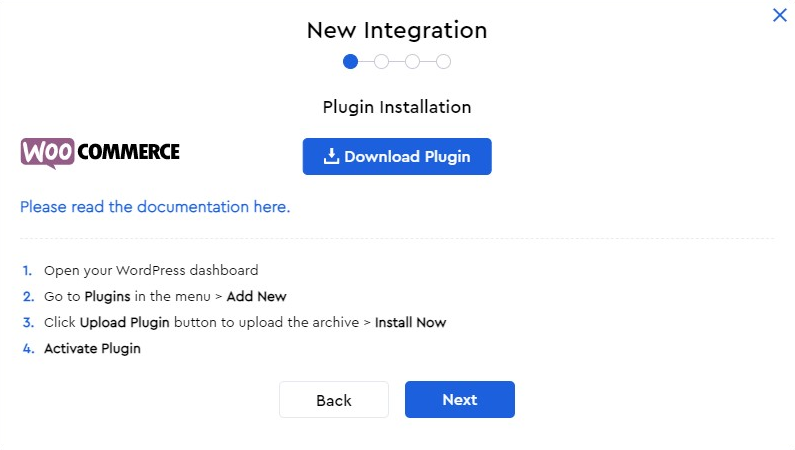
6 stepsA → a-api.coinpayments.netB → b-api.coinpayments.netC → c-api.coinpayments.net- In wp-admin, go to Plugins → Add New → Upload Plugin, upload the package, then click Activate.
- Open WooCommerce → Settings → Payments, enable CoinPayments, and open its settings.
- Paste your Client ID and Client Secret and confirm the webhook configuration.
- Choose your CoinPayments instance (A, B, or C) and click Save changes.
- Click Test Connection — it calls the CoinPayments API with your saved instance and credentials. A successful result confirms your credentials and entity routing are valid.
- Create a small WooCommerce test cart and open the invoice as a customer.
- Click Pay with CoinPayments and complete the hosted checkout.
- Confirm WooCommerce marks the order as paid and that the transaction ID matches the CoinPayments invoice / payment event.
- Review the WooCommerce gateway logs for webhook delivery or signature errors.
Keep your Client Secret safe
Your Client Secret is displayed only once when you create the integration. Store it securely — if it is lost you can regenerate it from the dashboard.
How it works
6 points- Invoices are created with the SDK postMerchantInvoicesV2 route.
- Checkout uses the
checkoutLinkreturned by that route. - The checkout opens in a new tab with
target="_blank"andrel="noopener noreferrer". - Webhooks are verified with the SDK
WebhookVerifier— see authenticating requests. - Paid / completed webhook events mark the WooCommerce order as
processingfor you to fulfill. - A created invoice is cached in the customer session to avoid duplicate invoices during invoice-page refreshes.
Troubleshooting
3 scenariosIf Test Connection fails
- Confirm the gateway settings were saved before testing.
- Confirm the selected instance matches your account.
- Confirm the Client ID and Client Secret belong to the same instance.
- Confirm the API integration credentials were copied correctly.
- Check whether IP restrictions were added to the CoinPayments integration.
If invoice creation fails
- Check the WooCommerce gateway logs for the CoinPayments API response payload.
- Confirm the store currency is supported by CoinPayments.
- Confirm the API integration has invoice permissions.
If payment reconciliation fails
- Confirm webhooks are enabled in WooCommerce.
- Confirm the callback URL is publicly reachable over HTTPS.
- Confirm Auto-register Webhook completed without errors.
- Confirm the WooCommerce server time is accurate; webhook signatures use timestamp freshness checks.
Tested environment
CoinPayments tested this gateway module in the environment above. Validate the module in your own WooCommerce environment before accepting live payments.
Disclaimer
This module has been tested by CoinPayments for standard installation, configuration, invoice creation, checkout, webhook handling, and payment reconciliation. It is provided on an as-is and as-available basis, with no guarantee that it is error-free, uninterrupted, or compatible with every WooCommerce environment.
Merchants are responsible for validating the module in their own environment before accepting live payments — create and reconcile several low-value test invoices, confirm webhook delivery, and review the gateway logs. Use of this module is subject to CoinPayments’ User Agreement and Privacy Policy.
Report any unexpected behaviour, payment mismatch, duplicate credit, webhook failure, or reconciliation issue to CoinPayments Integrations support.
Where to next?
Pick the most useful next step.