
Testing Currency · LTCT
Test with LTCT, on the house.
LTCT (Litecoin Testnet) is the free test currency CoinPayments provides for exercising the API end-to-end — create wallets, send transactions, generate invoices, and trigger webhooks without spending real crypto.
How to Claim LTCT
3 stepsSign in to CoinPayments and navigate to the Balances page on the dashboard.
Locate the LTCT row in your balances list and press the Get Free LTCT button next to it. The test coins are credited to your account immediately.
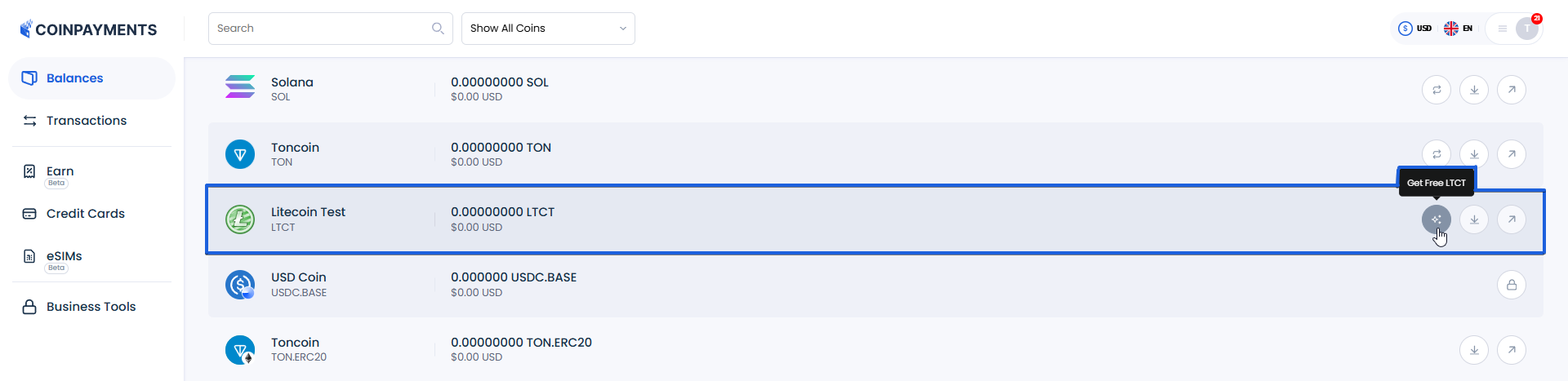
Use LTCT against any API endpoint exactly like a real currency — create a wallet, send a transaction, generate an invoice. Completely separate from your other balances.
If you don't transact with LTCT for seven days, the balance returns to the collective pool. There's no penalty — you can always claim more by repeating the steps above.
LTCT is a test currency with no real-world value. Once you're done testing and ready to accept real payments, turn it off in your Payment Settings so it can't be selected at checkout.
Now go break things (safely)
With LTCT in hand, you can exercise every authenticated endpoint without touching real funds.