
Payment Settings
Choose how received payments settle into your account.
Settlement modes
Five options — pick per-currency on the dashboardReceived payments sit in your CoinPayments wallet for later manual withdrawal. The simplest option — you choose when to move funds.
- DestinationYour CoinPayments wallet balance
- WhenAvailable after confirmation
- ConversionOptional — convert into another currency on the way in (or out)
- Best forHolding crypto until you decide to withdraw or convert.
Received payments are forwarded to an address or wallet you specify as soon as they're confirmed on-chain.
- DestinationAn external address or CoinPayments address you supply
- WhenOn the same confirmation that credits the payment
- ConversionOptional — convert into another currency before sending
- Best forReal-time payouts to a cold wallet or exchange deposit address, or centralized holdings.
Received payments accumulate, then ship in a single transaction once an hour. One on-chain transaction per hour instead of per payment.
- DestinationAn external address or CoinPayments address you supply
- WhenBatched every hour
- ConversionOptional — convert into another currency before sending
- Best forReducing on-chain fee load when payment volume is high.
Received payments accumulate, then ship daily at approximately midnight EST (GMT-05:00).
- DestinationAn external address or CoinPayments address you supply
- WhenDaily at approximately midnight EST
- ConversionOptional — convert into another currency before sending
- Best forPredictable daily cash flow with reduced fee overhead.
Received payments accumulate, then ship every Sunday at approximately midnight EST (GMT-05:00).
- DestinationAn external address or CoinPayments address you supply
- WhenWeekly on Sunday at approximately midnight EST
- ConversionOptional — convert into another currency before sendinge
- Best forMinimising fee exposure for low-velocity payment streams.
Accept payment in any supported currency, then automatically convert it to a stablecoin on the way in. Your customers pay in whatever coin they hold while you settle in a dollar-pegged asset — sidestepping crypto volatility without narrowing who can check out. Pick the conversion target per currency when you choose a settlement mode.
Where to configure
One screen on the dashboard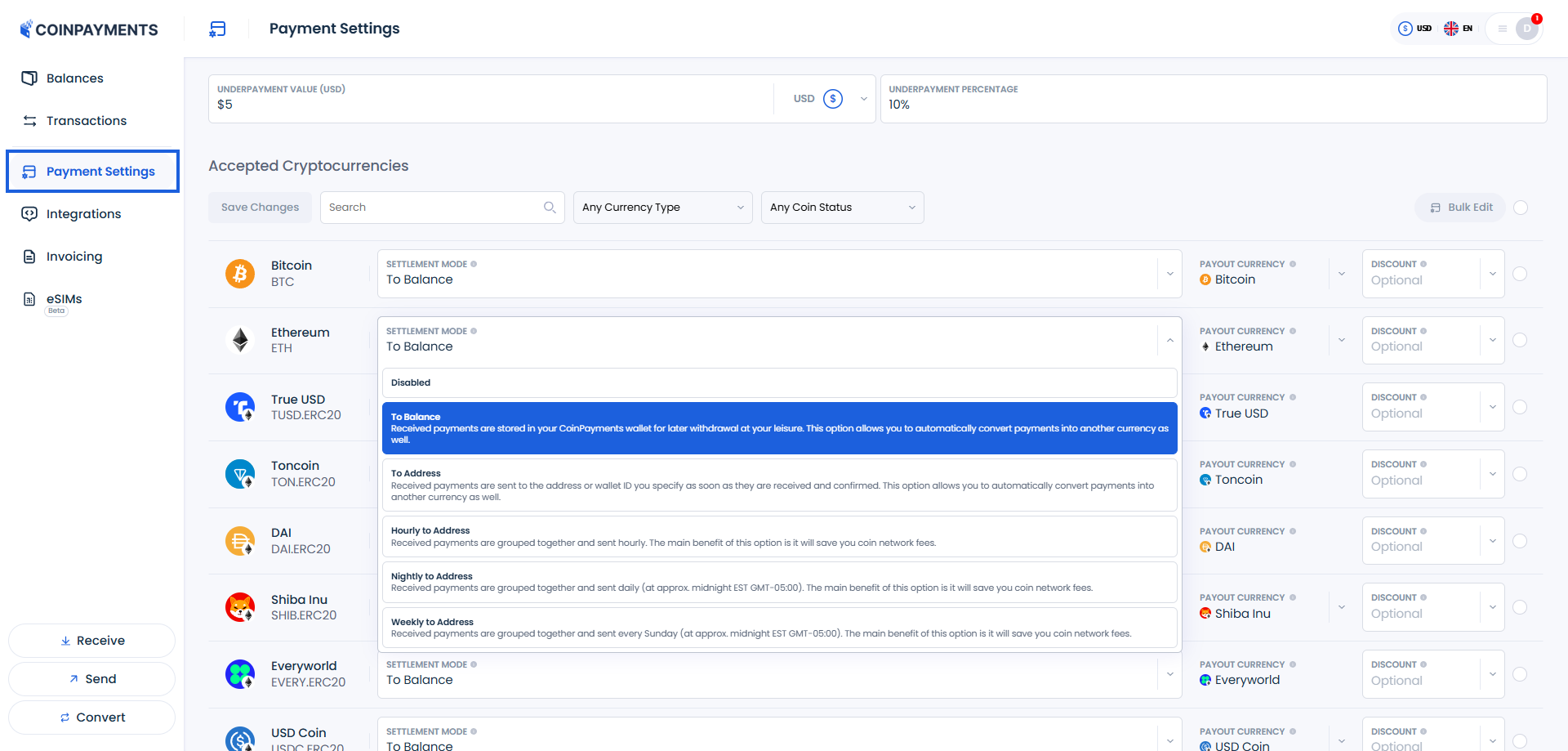
Batched modes save on network fees
Hourly, Nightly, and Weekly modes consolidate multiple received payments into a single outbound transaction. You pay the network fee once per batch instead of once per payment — meaningful savings on UTXO chains and a small payout latency trade-off.
Disabling a currency
Stop accepting a coin entirelyYou don't have to accept every coin. In Payment Settings, disable any currency you don't want to transact in — it then won't be offered to buyers at checkout or selectable when you create an invoice. A common step before going live: disable the LTCT test currency so it can never be picked for a real payment.
Where to next?
Pick the most useful next step.