
Payment Timeout
Invoice Lifecycle
A 60-minute window that holds the exchange rate steady.
Crypto-fiat exchange rates move every minute. To protect both you and the buyer, CoinPayments freezes the quoted rate for 60 minutes from the moment the checkout is opened. If the payment isn't received and confirmed inside that window, the invoice times out and any late funds are automatically refunded.
The 60-minute timeline
Open → accept → expire00:00Stage 1 of 4Checkout opened — rate locked
When the buyer opens the checkout, CoinPayments quotes the cryptocurrency amount at the current market rate and starts the 60-minute timer. The quoted amount won't move during the window.
0–60 minStage 2 of 4Acceptance window
The buyer can send funds at any point inside the window. As long as the payment is detected and confirmed before the timer expires, the invoice can transition normally through pending → paid → completed.
60:00Stage 3 of 4Timer expires
The checkout UI locks. Any unconfirmed payment in the mempool is no longer eligible to settle this invoice — the rate quote is stale.
Post-expiryStage 4 of 4Auto-refund on late confirmation
Funds that confirm after the timer expires (or were sent after expiry entirely) are automatically refunded to the buyer's claim address. The invoice transitions to timedOut.
What the buyer sees on expiry
Checkout state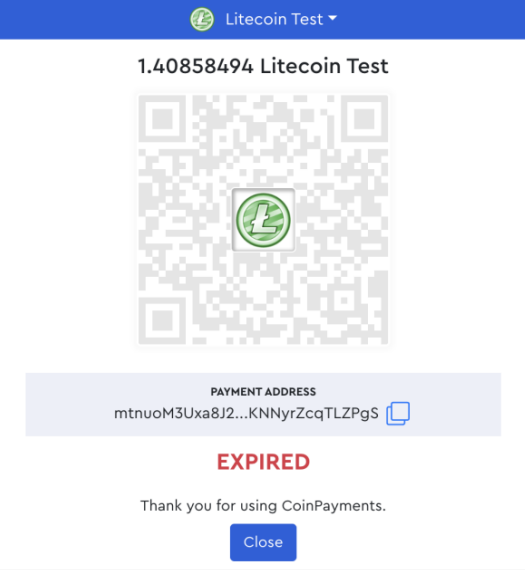
Sent in window, confirmed after — still a timeout
A buyer can broadcast a transaction at 59:30 that only mines past the 60-minute mark. The funds are real but they didn't confirm in time — the invoice transitions to timedOut and the funds are automatically refunded once they finalise on-chain. Worth flagging to high-value buyers: leave a buffer.
Restarting the payment
If the timer expires before funds are sent, the buyer can restart the flow by closing and reopening the checkout page. That re-quotes at the current market rate and starts a fresh 60-minute window.
Where to next?
Pick the most useful next step.