
Historical Balances
Knowledge Base
Review a wallet's historical balance.
The Balances page lets you rewind your account to any moment in time. Pick a currency, a wallet, and a date — and CoinPayments surfaces the balance held at that point. Perfect for reconciliation, audits, and quarterly snapshots.
How to view
4 stepsStep 1Open the Balances page
Head to Balances on the dashboard — the home for every wallet on your account.
Step 2Click "View wallet balances by date"
The button sits in the top-right of the Balances screen.
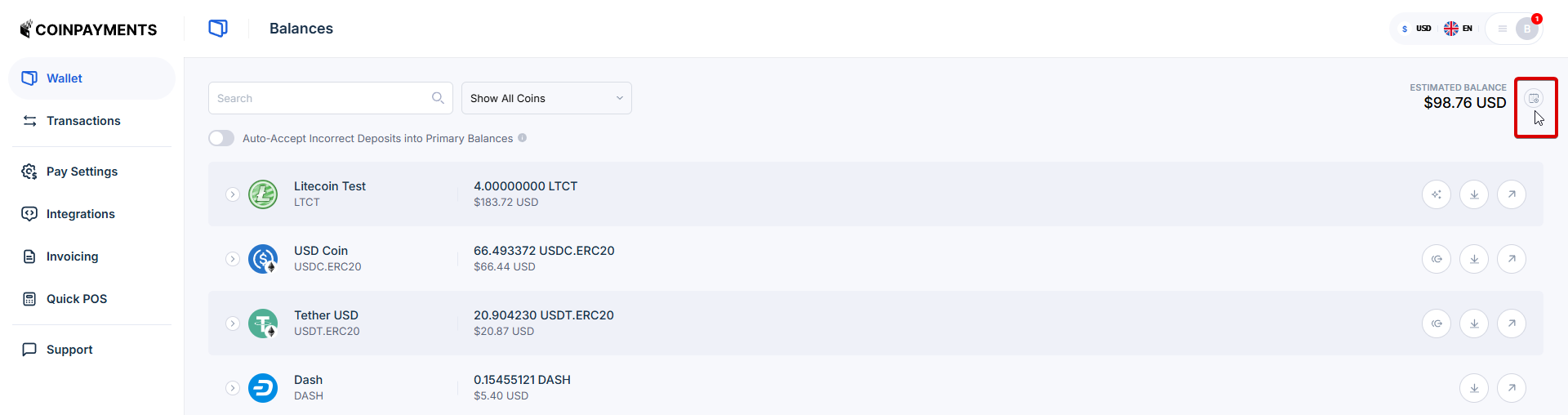
Step 3Pick the currency, wallet, and target date
Select what you want to review. The wallet can be a primary dashboard wallet or an API integration wallet.
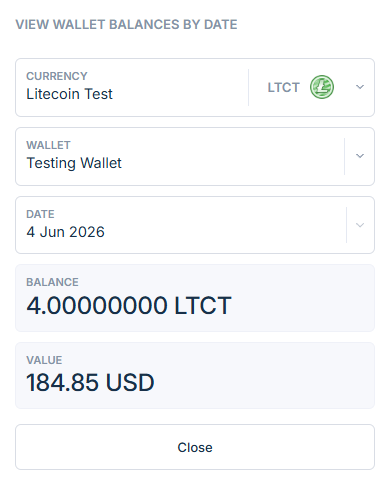
Step 4Review the balance
The balance for the selected wallet on the selected date appears, alongside the fiat equivalent.
Both wallet types are supported
The wallet picker covers both primary dashboard wallets (created from the dashboard UI) and API integration wallets (created via the wallets API). Read up on the distinction in UI vs API Wallets.
Customize the fiat display currency
Balances render with a fiat equivalent. Change the display currency in your account preferences.
Where to next?
Pick the most useful next step.