
Sales
Talk to the Sales team.
The Sales team handles product inquiries, pricing questions, partnership discussions, and specialized business needs. Use this channel when evaluating CoinPayments for commercial use or scaling an existing integration.
- Volume-based pricing requests
- Custom business solutions
- Merchant expansion planning
- Partnership or white-label opportunities
- High-volume onboarding assessments
Demo Booking
Book a Demo
Request a demo using our CoinPayments business inquiry form. Provide basic company details, expected volume, contact info, and industry — a Sales representative will qualify your use case and schedule a discovery call.
Telegram 1-on-1
Telegram Direct Chat
Start a direct conversation with the Sales team via Telegram. This option lets you send a message immediately without filling out the demo form.
Telegram Group Integration
4 stepsCreate a new Telegram group named after your business, e.g. Company x CoinPayments – Sales.
Invite the bot below into the group as a member:
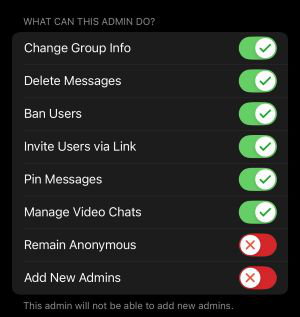
Promote the bot to administrator with the exact permissions shown below — missing or restricted permissions will break the integration.
Post a message to the bot containing:
- Brand name of your company
- Legal entity (if different)
- First name
- Last name
- Email associated with your account
- What you need help with
Slack Connect Integration
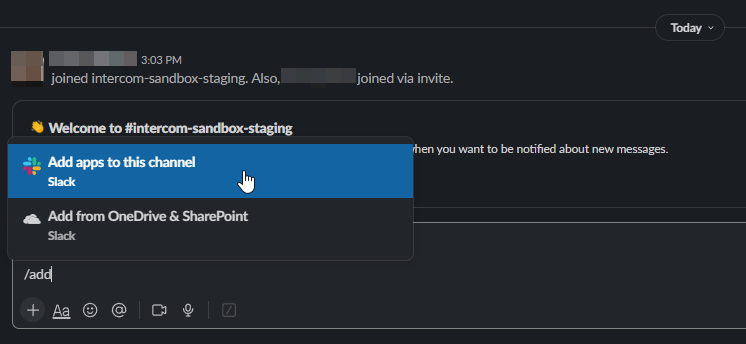
4 stepsRun /add inside your Slack channel. You'll be prompted to install an application to the current channel.
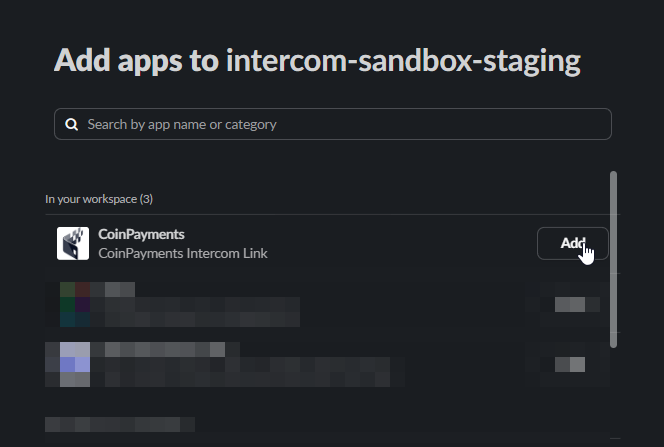
Locate the CoinPayments Support app within Slack and install it.
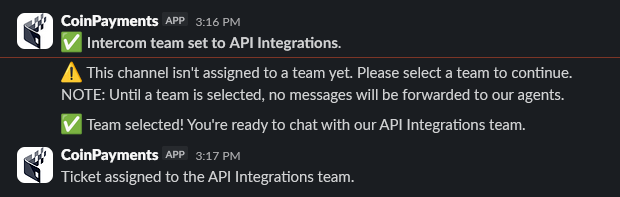
Pick the department you want the conversation routed to. The inbox and department are managed by CoinPayments staff following onboarding.

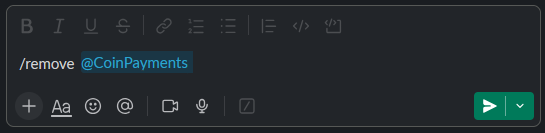
To uninstall, execute /remove @CoinPayments in any channel where the app is installed.

Where to next?
Browse the docs, or jump back to the contact directory.