
Customer Support
Request Customer Support.
Customer Support resolves operational issues affecting accounts, transactions, payouts, and platform functionality. Include Support IDs and Transaction IDs (TXIDs) to enable faster investigation.
- Account access problems
- Transaction delays or discrepancies
- Payout or withdrawal issues
- Dashboard errors or configuration problems
- General service-related concerns
Support Ticket
Create a Ticket
When an issue requires direct assistance, submit a support ticket so it can be tracked and escalated to the correct team.
Recommended ticket preparation
- Describe the issue concisely
- Include Support IDs and/or Transaction IDs (TXIDs)
- Include the affected account
- Add environment or browser details
- Attach logs or screenshots if relevant
- Clarify urgency and operational impact
WhatsApp Chat
Chat on WhatsApp
Connect directly with Customer Support through our WhatsApp integration. Scan the QR below to start instantly.

Scan to start chatting
Open WhatsApp on your phone and scan this QR to start a conversation with the CoinPayments Customer Support team immediately.
Telegram Group Integration
4 stepsCreate a new Telegram group named after your business, e.g. Company x CoinPayments – Support.
Invite the bots below into the group as a member:
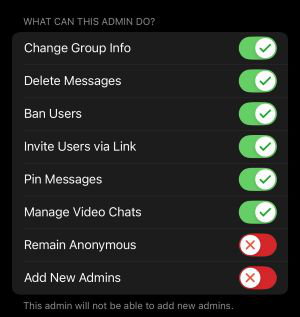
Promote the bot to administrator with the exact permissions shown below — missing or restricted permissions will break the integration.
Post a message to the bot containing:
- Brand name of your company
- Legal entity (if different)
- First name
- Last name
- Email associated with your account
- What you need help with
Slack Connect Integration
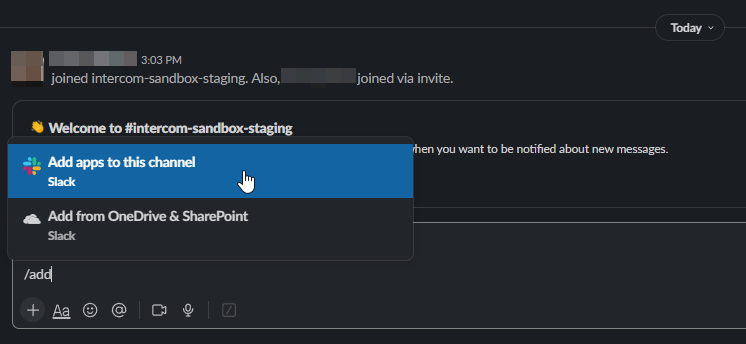
4 stepsRun /add inside your Slack channel. You'll be prompted to install an application to the current channel.
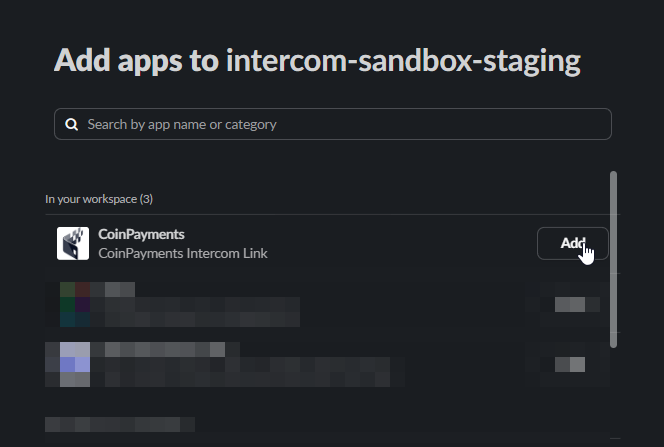
Locate the CoinPayments Support app within Slack and install it.
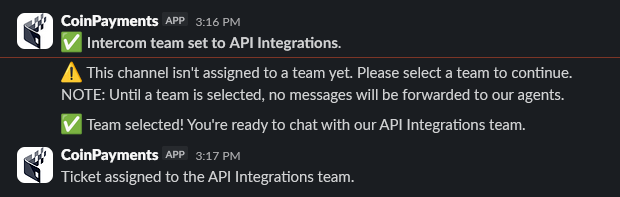
Pick the department you want the conversation routed to. The inbox and department are managed by CoinPayments staff following onboarding.

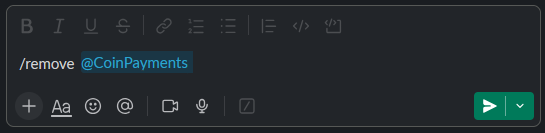
To uninstall, execute /remove @CoinPayments in any channel where the app is installed.

Where to next?
Browse the docs, or jump back to the contact directory.