
Client Webhooks Setup
Setup
Three ways to attach webhooks to invoice events.
Client webhooks can be configured in three places — at the integration level from the dashboard, at the integration level via API, or per individual invoice. All three produce signed callbacks for the event types you opt into; pick the scope that matches how your integration handles attribution.
Where to configure
Pick your scopeDashboard · IntegrationRecommended
Configure at integration creation
When you create a new API integration from the dashboard, pick the event types you want and provide the endpoint URL right there. Applies to every invoice issued under that integration — set it once and forget it.
- ScopeWhole integration
- WhereDashboard → Create API Integration
- Best forNew integrations and most production setups.
API · IntegrationPOST/merchant/clients/:id/webhooks
Attach to an existing integration via the API
Programmatically subscribe an existing integration to webhook events. You can attach multiple endpoints to one integration — useful when different downstream services consume different event types from the same merchant. The :id path parameter is the integration's clientId.
- ScopeWhole integration
- EndpointPOST /merchant/clients/:id/webhooks
- Request bodyEvent types and an HTTPS endpoint URL. Subscribing to invoiceCompleted alone is enough if you only need the terminal credit event.
- Best forRotating endpoints, IaC-driven setups, or fanning out to multiple services.
API · Per invoicePOST/merchant/invoices
Override on a single invoice
Pass a webhookUrl in the create-invoice request body to send events for that one invoice to a different endpoint. Falls back to the integration-level configuration when omitted — the per-invoice URL only overrides for the invoice it was supplied with.
- ScopeSingle invoice only
- EndpointPOST /merchant/invoices
- FieldwebhookUrl on the invoice request body.
- Best forPer-customer or per-product attribution where one global endpoint is too coarse.
HTTPS endpoints only — and verify the signature
Every endpoint URL you supply (any of the three scopes) must be publicly reachable over HTTPS. Verify the HMAC signature on every delivery before trusting the payload — see Authenticating Requests.
Delivery flow
How an invoice event reaches your endpoint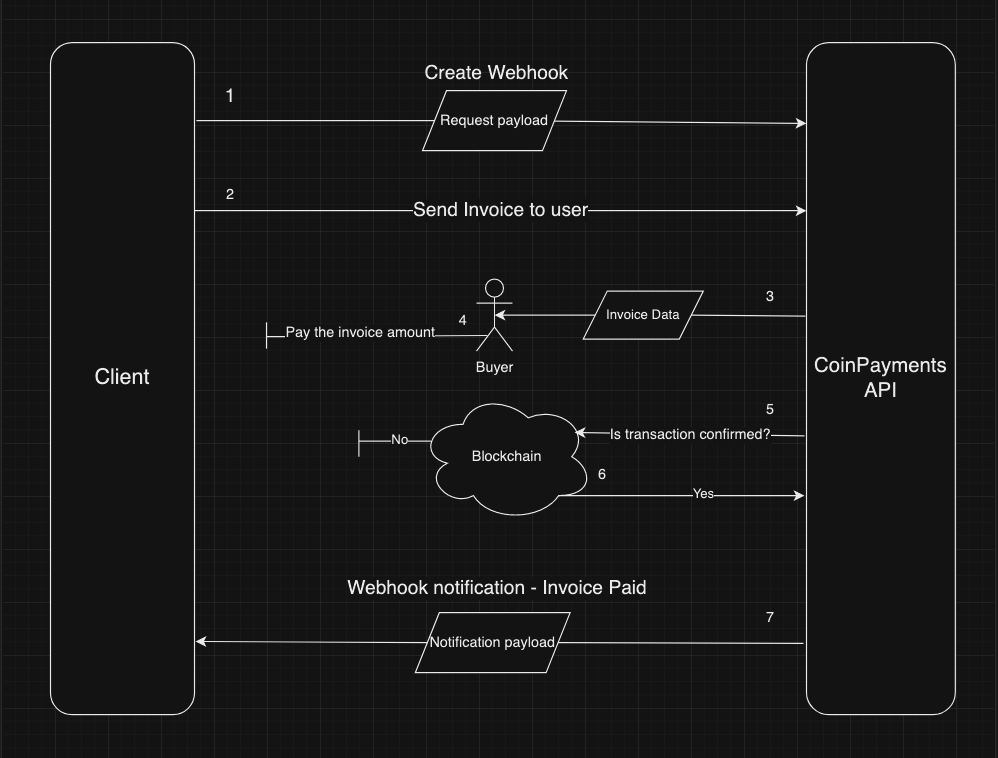
Where to next?
Pick the most useful next step.