/merchant/wallets/:id/spend/requestSubmit a Spend Request
postMerchantWalletsSpendRequestByIdV2https://a-api.coinpayments.net/api/v2/merchant/wallets/:id/spend/requestRequest
Body · path parametersResponses
200 · 401 · 403Wallets & Integration Scope
It is important to note that spend requests executed via the API can only be used with wallets created
by the same integration.
See this section for more information.
Spend Request Lifecycle
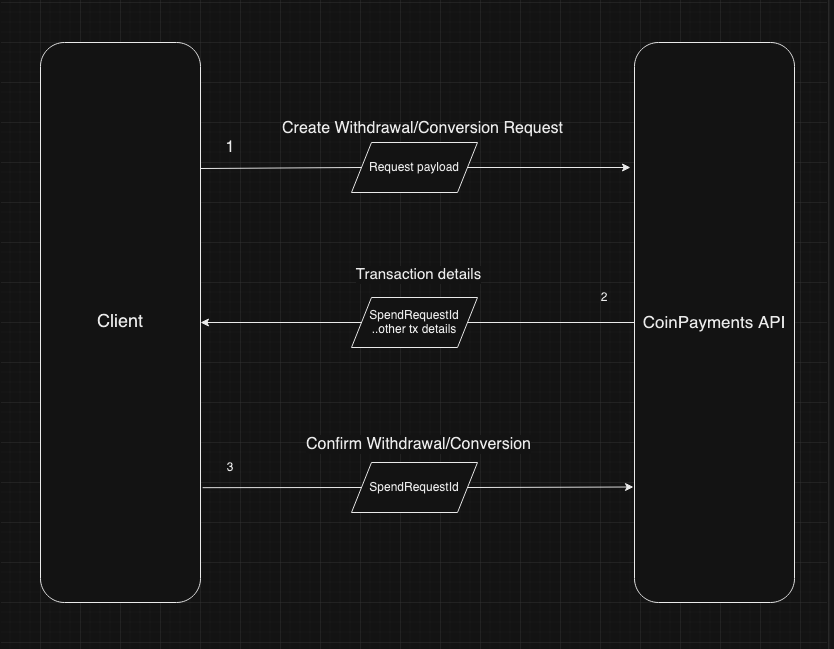
2-step flowSpecify the source wallet, the destination (address or currencyId for conversions), and the amount. CoinPayments returns a pending request with a unique id.
Post a confirmation against the request id to actually broadcast it. This two-step flow gives you a window to validate or back out before funds move.
Currency Conversion
The create spend request endpoint can also be used to convert cryptocurrencies.
Address and Currency Validation
When sending funds to an address, make sure that the destination address matches the token/coin
that you are crediting.
If the currencies do not match, this may result in funds being stuck in the network or even lost.
Here's a simplified flow chart explaining the withdrawal/conversion flow: